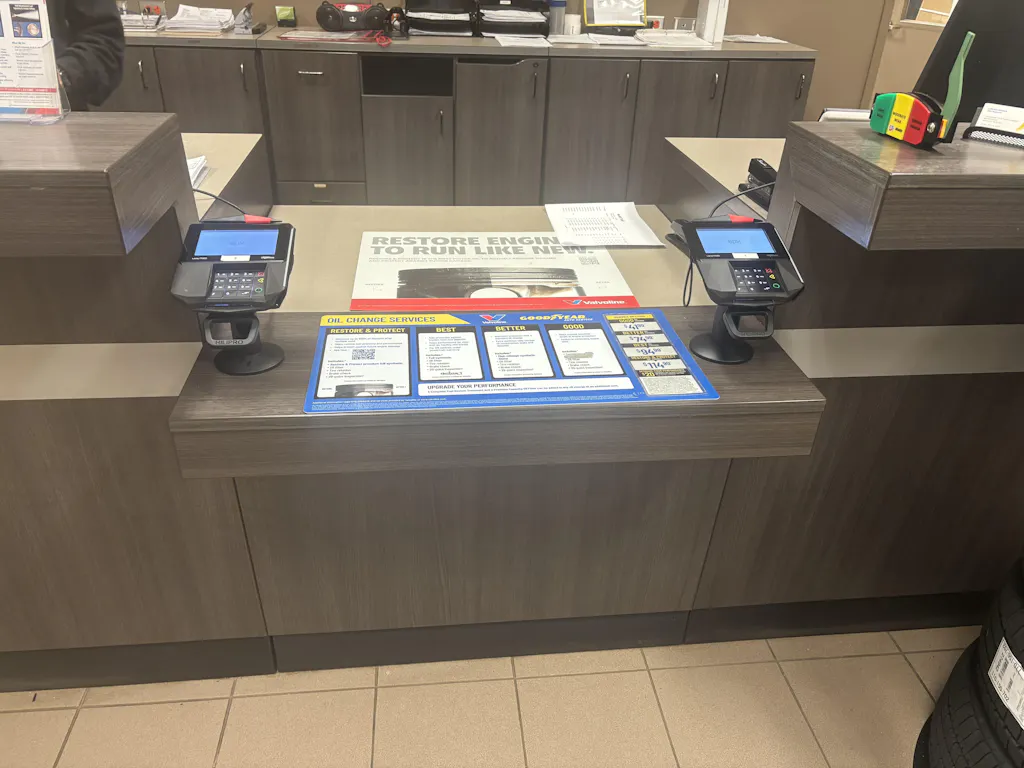
If you have ever watched a customer fumble with a payment terminal that keeps sliding around the counter, you already know the problem. The Dejavoo Z8 is a compact, lightweight countertop payment terminal, and that lightweight design is precisely what makes it prone to shifting during chip inserts and tap payments.
Without a proper mount, the terminal slides, cables get pulled, and every transaction takes a few extra seconds longer than it should. Over a full day of trading, that adds up fast.
A dedicated countertop mount fixes all of these issues. It gives your checkout station a clean, stable setup that handles real retail traffic without any drama. This Dejavoo Z8 Mounting Guide for Retail Stores walks you through picking the right mount, installing it correctly, routing cables cleanly, and testing everything before you open for business.
The Dejavoo Z8 is a full-featured countertop payment terminal with a built-in thermal printer, integrated PIN pad, and support for chip, swipe, tap, and contactless payments. It has a small footprint that fits comfortably on even the tightest checkout counters, which is a genuine advantage in most retail environments.
That compact size does come with one practical challenge: light terminals move. During PIN entry, chip inserts, or even just a customer reaching across the counter, an unmounted Z8 will slide. Mounting eliminates that entirely.

Mounting a payment terminal is not just about keeping things neat. There are real operational and financial reasons why secure card terminal mounting matters for any retail business. A good starting point is understanding why your credit card terminal mount matters stability, cable protection, and professional presentation are all connected.
Here is what actually happens when a terminal goes unmounted:
Checkout flow
A terminal that moves during a transaction slows everything down. Customers adjust it, cashiers steady it, and small delays stack up across hundreds of daily transactions.
Cable wear
Every time the terminal shifts, the power and data cables at the base flex under stress. That repeated movement causes fraying and eventually connection failures at the worst possible moments.
Security
An unmounted terminal sitting loose on a counter can be lifted and walked out of the store. This scenario is not theoretical. Locking features prevent fraud, making clear why a POS terminal anti-theft mount is worth investing in, especially in high-footfall locations.
Customer experience
A stable, properly positioned terminal makes every transaction feel smoother, removing friction right at the finish line.
If you want to understand what makes a checkout work well, 6 ways to improve your customer's retail checkout experience covers how mounting fits into the overall checkout setup.
Before choosing a mount, it helps to know what categories exist and what each one is actually good for. There are more options than most retailers expect.
Here is a quick comparison table:
|
Mount Type |
Flexibility |
Security Level |
Best For |
|
Swivel Stand |
High (180°+) |
Medium-High |
Customer-facing retail, high traffic |
|
Fixed Countertop Mount |
None |
Very High |
Grocery, busy checkout lanes |
|
Adhesive (3M pads) |
None |
Medium |
Leased spaces, marble/glass counters |
|
Screw-Down Mount |
None |
Maximum |
Permanent installs, wood/laminate |
|
VESA-Compatible Setup |
Moderate |
High |
Retrofit installs |
Recommended Read: Before you decide, this guide on what are the different types of POS machine stands is worth reading first.
POS swivel stand installation is the most popular choice for retail stores where the terminal needs to face both the cashier and the customer. A good swivel mount rotates 180° or more, so the cashier can configure the transaction and then spin it toward the customer for PIN entry no handing the terminal back and forth. Vertical tilt adjustment means the screen angle works for both standing staff and shorter customers.
When security and stability take priority over rotation flexibility, a fixed countertop mount is the stronger choice. These attach permanently to the counter surface and do not rotate. That sounds limiting, but in a high-volume grocery lane or pharmacy checkout where every second counts, a fixed mount means the terminal is always positioned exactly where it should be.
If you are still weighing up whether fixed or swivel is the right fit for your store layout, comparing fixed and swivel POS stands: pros and cons covers the tradeoffs without pushing one direction.
Screw-down mounts deliver the highest level of security. They require drilling pilot holes into the counter and are best suited to wood and laminate surfaces. Once installed, removing the terminal requires tools and deliberate effort. These are the right call for any permanent retail location where the counter is yours.
Adhesive mounts use industrial-strength 3M adhesive pads to bond the base plate directly to smooth counter surfaces glass, marble, polished stone, and sealed laminate. No drilling required, which makes them the standard choice for leased retail spaces. The bond is genuinely strong, but it does degrade over time with heat, humidity, and cleaning products.
Choosing between adhesive vs. screw-mount POS stands helps you match the right attachment method to your specific surface and lease situation.
One thing many retailers overlook: adhesive pads need to be replaced on a schedule. A bond that felt secure six months ago may not be holding as well today.
Need the right mount for your Dejavoo Z8? Hilipro carries dedicated swivel stands and countertop mounting hardware built specifically for the Dejavoo Z8 and Z11.
Learn what a mounted POS can do for your business
Getting everything together before you start saves real time. Here is the full Dejavoo Z8 mounting instructions checklist:
Dejavoo Z8 backplate or VESA adapter plate (75mm or 100mm depending on stand model)
Heavy-duty mounting pole or stand base
Screws or industrial-strength 3M adhesive pads
Allen key and adjustable wrench
Power drill with pilot bit (screw-down installs only)
Cable clips, braided cable sleeves, and zip ties
Isopropyl alcohol wipe for surface cleaning
Level tool (optional but useful)
The backplate deserves a mention here because it is easy to overlook until you are halfway through the install. Why you should get a backplate for your credit card terminal and how the right backplate creates a secure connection point between the terminal and the stand while also protecting the rear of the device.

This is a straightforward install. Follow each step in order and you will have a solid, professional setup done in under 30 minutes.
Before touching any hardware, choose your position carefully. The terminal needs to be within comfortable reach for customers without forcing them to lean awkwardly across the counter. Think about direct sunlight and overhead light angles both create glare that makes the screen hard to read.
Height matters too. ADA-friendly placement puts the screen center between 40 and 45 inches from the floor, which is accessible for customers of varying heights and mobility needs. ADA mounting heights for credit card stands cover the compliance side of this issue.
Clean the counter surface thoroughly before committing. Dust, grease, or cleaning product residue will undermine any adhesive bond.
For adhesive mounts, press the base plate firmly onto the clean surface and hold for 30 to 60 seconds. Let it cure for at least one hour before attaching the terminal. For screw-down mounts, use the base plate as a drilling template, mark pilot hole positions, and drill slightly undersized holes to prevent material splitting. Drive screws firmly without overtightening.
Taking an extra minute to establish the base level at this stage is worthwhile.
How to set up your POS stand for optimal use provides practical guidance on base installation that is directly applicable to countertop setups, such as the Dejavoo Z8.
Line up the terminal's backplate with the mounting plate on the stand. Most mounts use either a slide-in locking channel or a screw attachment through the backplate. Once seated, the connection should feel completely solid with no wobble in any direction.
If anything feels loose at this stage, stop and fix it before moving on. A loose attachment at installation only gets worse with daily use and customer handling. Knowing what elements to look for in a quality POS stand helps you identify whether a loose feeling is a setup issue or a sign that the stand itself is not the right fit for your terminal.
This step is where most installations cut corners, and the consequences become evident within weeks. Effective cable management for the Dejavoo Z8 involves routing cables through the mounting pole's internal channel when the stand supports it, then running them along the underside of the counter to the power outlet and network connection.
Leave enough slack in the cable before the first clip so that swivel rotation at full range never puts tension on the connection point. A cable under tension during swivel movement will fail eventually; it is just a matter of when. The importance of cable management in POS stands is equal to that of the physical mounting itself.
Do not skip this step. Apply firm hand pressure from the front, back, and both sides. A properly mounted terminal should not move at all. If you have a swivel stand, rotate through the full range and confirm that movement is smooth with consistent resistance and no binding points.
Check the cables again during the swivel test nothing should pull tight or kink at any point in the rotation. If you encounter issues at this stage or later,
Installing a new Dejavoo Z8 mount in your store? Hilipro's Dejavoo-compatible stands come with everything you need for a clean, professional countertop installation. Why every business should invest in swivel POS stands
Effective cable management for the Dejavoo Z8 is not just about appearances. Tangled, exposed cables snag bags and clothing, pull on terminal connections, and create a genuine trip hazard behind the counter. The impact of cable management on POS stand functionality results in poor cable routing, which affects both hardware lifespan and transaction speed.
Here is how to do it right for a retail POS mounting guide standard:
Run cables through the mounting pole's internal channel wherever the stand design allows it
Use adhesive cable clips to secure runs along the underside of the counter lip where internal routing is not possible
Leave 4 to 6 inches of deliberate slack before the first clip point so that swivel movement never puts tension on the connections.
Use braided cable sleeves on any cable sections that remain exposed to protect against daily abrasion
Keep power and data cables separated where practical to reduce interference
Label cables at both ends this saves significant time during any future servicing or terminal swap
Getting the mount installed correctly is only half the job. Where and how you position the terminal determines whether it actually works well in real transactions.
Recommended Read: 5 key components of proper POS ergonomics in retail
Set the terminal tilt between 45° and 60° from vertical. That range keeps the screen visible to a standing cashier during transaction setup while remaining readable for a customer at the counter. Too flat and your staff cannot see it during configuration; too upright and shorter customers deal with glare.
The tilt adjustment on your swivel stand matters more than most retailers realise before they start using it. Maximizing efficiency through swivel and tilt features in POS stands tilt range, and swivel tension affect the speed and comfort of every single transaction.
Most stores land the screen center between 40 and 45 inches from the floor. That range satisfies ADA accessibility guidelines and works for the widest range of customer heights. If your counters are unusually high, or your customer base includes a significant proportion of wheelchair users, adjust toward the lower end of that range.
To reduce glare, avoid positioning the terminal directly below overhead pendant lights or facing windows. Even a 5- to 10-degree tilt adjustment can eliminate glare that seemed unavoidable at the original angle.
Once everything is installed, run through this full checklist before the store opens:
Power-on flex test power up the terminal and apply firm hand pressure from every direction. Nothing should move.
Full swivel range test rotate the terminal through its complete travel. Movement should be smooth with consistent resistance throughout.
PIN entry pressure test simulate a customer pressing firmly on the keypad. The base should not lift or rock.
Cable movement check watch each cable throughout the full swivel range. No cable should pull tight or develop a sharp kink at any rotation point.
Screw and collar tightness tighten any adjustment collars or structural screws that feel soft. Vibration and daily use will loosen them over time.
Repeat this checklist every few months. Connections that felt solid at installation can loosen gradually without being obvious until something fails.
Even a well-planned install can encounter problems, especially in high-traffic retail environments. If you are reconsidering your setup type after running into issues,
Countertop vs. swivel stand which one is better for POS is a useful reference for deciding whether a different mount style would serve your layout better.
|
Problem |
Likely Cause |
Solution |
|
Stand wobbles during use |
Loose structural screws or weakened adhesive bond |
Tighten all screws; replace adhesive pads if bond has degraded |
|
Screen glare blocks visibility |
Terminal positioned under bright overhead light or facing window |
Adjust vertical tilt or reposition away from light source |
|
Exposed cables are fraying |
Cables running outside the pole without protection |
Route cables internally through pole; add braided sleeve to exposed sections |
|
Mount shifts during transactions |
Insufficient hardware for the counter surface type |
Upgrade to screw-down hardware; reposition base onto firmer surface area |
|
Swivel feels stiff or rough |
Debris in swivel joint or over-tightened collar |
Clean the joint thoroughly and re-adjust collar to allow smooth movement |
Are you dealing with a terminal that is wobbling or shifting? The right mount hardware solves the problem permanently. Hilipro's Dejavoo Z8 stands are engineered for stability under real retail conditions. See what makes a Hilipro stand built to last
The best mount depends entirely on what kind of store you run and how your checkout lane operates day to day.
High-traffic grocery or convenience stores need heavy-duty, mild-steel mounts built to handle constant use without loosening over time. A fixed or screw-down swivel stand is the best choice here.
Boutique or specialty retail can generally work well with a lighter swivel stand. Customer interactions tend to be slower and more personal, so the 180° rotation delivers more value than maximum structural mass.
Small checkout counters need compact mounts specifically. A base that is too large actually takes up more counter space than the unmounted terminal did. Look for compact stands with integrated cable channels that solve both problems at once.
Leased retail spaces should default to industrial adhesive mounting. No drilling required, and when the lease ends, you are not leaving holes in someone else's counter.
Security-focused setups if terminal theft is a genuine concern at your location, a POS terminal anti-theft mount with a locking attachment mechanism adds a meaningful deterrent without making daily operations any harder. Maximizing security with your POS stand is the right reference here it covers locking mechanisms, tamper resistance, and what the hardware should include.
Before you buy anything, it is worth spending a few minutes with the POS stand buying guide: features to look for. It covers material durability, VESA compatibility, locking options, and the questions worth asking any supplier before you commit.
A properly mounted Dejavoo Z8 is faster to use, harder to steal, better for your cables, and more professional-looking than one sitting loose on the counter. The Dejavoo Z8 setup guide above is straightforward if you take it one step at a time, and the difference shows up immediately in smoother transactions and a cleaner checkout area.
Whether you are setting up a single register or outfitting a full store, elevate your checkout experience with Dejavoo POS terminal stands from Hilipro built specifically for Dejavoo terminals and designed to handle the demands of busy retail environments day after day.
Ready to set up your Dejavoo Z8 the right way? Hilipro stocks the full range of Dejavoo Z8 swivel stands, countertop mounts, and mounting accessories with everything you need for a professional, secure checkout setup. Check our Hilipro Dejavoo Z8 Stands
A swivel countertop mount works best for most retail stores because it allows the terminal to face the customer during PIN entry while keeping it fully secured to the counter. For high-security environments, a screw-down fixed mount offers maximum protection.
Yes. Industrial 3M adhesive pads create a forceful bond on smooth surfaces, including glass, marble, and sealed laminate. They are the standard solution for any leased retail space where drilling is not permitted.
The Dejavoo Z8 typically supports 75mm or 100mm VESA-compatible mounting systems depending on the backplate and stand model. Confirm the specification with your stand supplier before ordering.
Most stores install the terminal with the screen centered between 40 and 45 inches from the floor. That range is comfortable for most customers and meets ADA accessibility requirements.
Route cables through the mounting pole's internal channel and leave 4 to 6 inches of slack before the first cable clip so swivel movement never puts tension on the cable connection. Use braided sleeves on any exposed sections.
The most common causes are loose structural screws, a degraded adhesive bond due to age or surface contamination, or an uneven mounting surface preventing full contact. Check all three before assuming new hardware is needed.
Adhesive mounting works best on clean, smooth, non-porous surfaces like glass, marble, polished stone, and sealed laminate. Rough, textured, or painted surfaces do not bond reliably with adhesive pads.
Reposition the terminal so it is not directly below overhead pendant lights or facing a window. A small tilt angle adjustment of 5 to 10 degrees often eliminates glare completely even when the position itself cannot change.