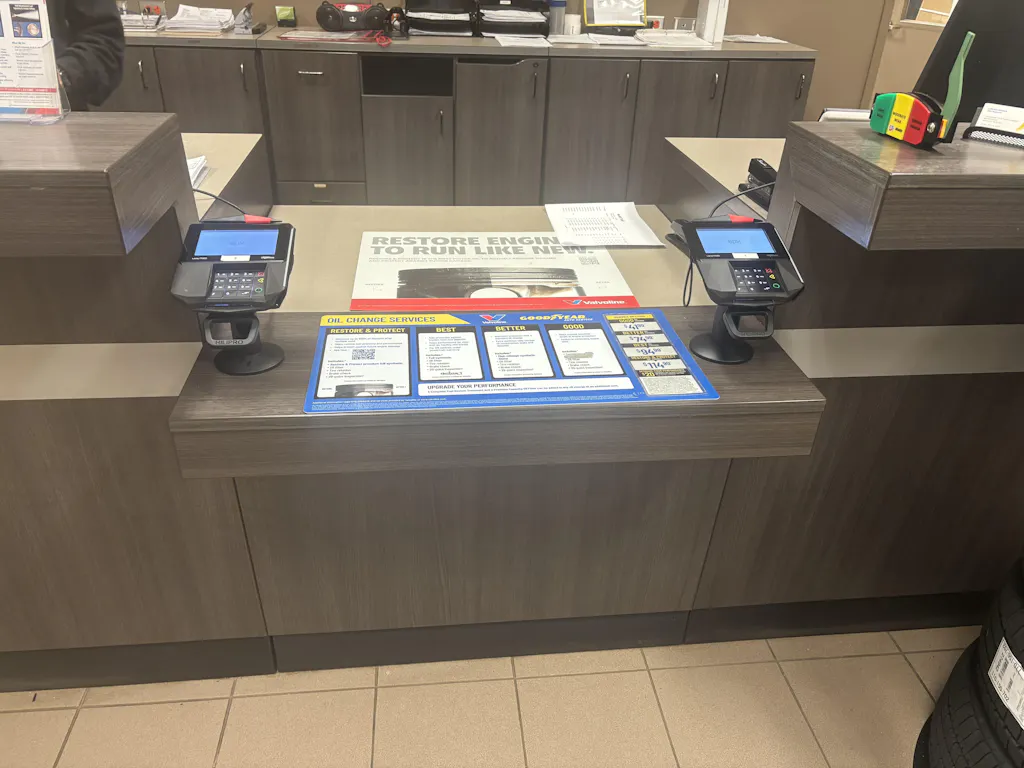
A payment terminal sitting loose on your counter is a problem waiting to happen. It slides around. Cables get yanked. Customers fumble trying to tap or pin. And honestly, it just looks unprofessional.
A proper POS terminal mount fixes all of that. It holds your terminal in place, keeps cables organized, and makes the whole checkout experience smoother for both your staff and customers.
In this guide, we're breaking down the best mount for the Ingenico iCT220 & MX915: what to look for, which types work best, and how to pick the right one for your specific setup.
|
Mount Type |
Best For |
Rotation |
Key Advantage |
|
Countertop POS Mount |
Staff-facing checkout |
Fixed or limited tilt |
Stable, secure positioning |
|
Swivel POS Mount |
Customer-facing terminals |
330° Swivel / Tilt |
Better customer interaction |
|
Fixed POS Stand |
High-volume retail |
Fixed position |
Maximum stability, cable protection |

So why does the mount even matter? Many businesses skip it and just set the terminal on the counter. Big mistake.
Here's what actually goes wrong without a secure POS mount:
Terminals shift during busy rushes and create awkward moments at checkout
Cables get pulled repeatedly, damaging connectors faster than you'd expect
Loose terminals are easier targets for skimmer overlays and unauthorized swaps
The checkout looks messy and unorganized, which affects how customers see your business
A solid payment terminal stand solves all of these issues. It also opens up your setup to work better for different environments: retail stores, restaurants, kiosks, and self-service stations. The use cases are wide.
Want to understand what a mounted POS actually is and whether it's right for your business? That's a good starting point.
When a terminal is properly mounted, customers don't have to grab it and tilt it themselves. PIN entry is easier. Tap-to-pay sits at the right angle. Signatures feel natural.
This stuff sounds small, but it genuinely speeds up checkout and reduces that awkward back-and-forth moment where nobody knows who's holding the terminal.
Repeated cable strain is one of the top reasons terminals fail early. A reliable mount keeps the cable path consistent and protected.
Fewer drops. Less connector damage. Better long-term reliability. It's basically a simple investment that pays off over years of daily use.
Recommended Read: Learn more about why your credit card terminal mount matters for long-term durability.
There are a few main types of mounts you'll come across. Each one serves a different purpose depending on how your checkout is set up.
These are the preferred option for staff-side setups. The terminal stays in a fixed position facing the cashier or staff member. This arrangement is common in grocery stores, pharmacies, and general retail.
They're stable. They don't move around. And staff primarily use terminals like the Ingenico iCT220, while customers do not.
Learn countertop vs. swivel stands difference for POS setups to figure out which direction makes more sense for your checkout.
These are where it gets more flexible. A 330° swivel lets you rotate the terminal toward the customer when needed, then swing it back toward staff. The Verifone MX915 mount setup almost always calls for this type.
Tilt adjustment means customers with different heights or accessibility needs can still interact comfortably. It's a big deal for tap-to-pay and signature capture.
Find out how tilting and swiveling POS stands improve accessibility for customers.

Not all mounts are equal. Cheap universal options might look fine in the product listing but cause headaches once installed. Here's what actually separates a good mount from a bad one.
|
Feature |
Why It Matters |
|
Model-specific compatibility |
Proper fit prevents wobbling and cable strain |
|
Locking system |
Protects against theft and terminal swaps |
|
Cable management |
Cleaner setup, longer terminal life |
|
Build material |
Metal outlasts plastic in busy environments |
|
Swivel range |
Needed for customer-facing interaction |
This is probably the most overlooked thing when people shop for a countertop credit card terminal mount. While the pole or base might be universal, the cradle or backplate has to match your specific terminal.
The Ingenico iCT220 typically needs a compact click-in or screw-mounted baseplate. It's a staff-facing terminal, so stability matters more than swivel range.
The Verifone MX915 is heavier and takes stylus pressure during signature capture. It needs a wider, reinforced backplate that can handle that without wobbling or shifting.
A poor fit leads to a wobbling terminal, unreliable signature capture, and constant cable strain, accelerating hardware wear and frustrating both staff and customers
This is precisely why you want to use a proper backplate for your credit card terminal not just whatever fits loosely.
Loose terminals are a real security risk. PCI-DSS Requirement 9.9 specifically requires businesses to protect payment terminals from tampering and unauthorized installation.
Terminals sitting freely on counters are easier targets for overlay skimmers and terminal swaps. Bolted and locked POS mounts make such attacks significantly harder. They also show customers that your checkout environment takes security seriously.
Also worth reading: How to use POS stands to improve PCI compliance.
Hidden cable routing is more than just aesthetics. When cables are managed properly through the mount, they don't get yanked, bent, or pinched during normal use.
That means fewer connector failures. Cleaner counters. A more professional look overall. The importance of cable management in POS stands is something many businesses only appreciate after dealing with a damaged terminal.
Metal mounts outlast plastic ones in busy retail environments. Full stop. Plastic mounts are lighter, but they wear out under constant daily use, especially at the swivel joint.
If you're running a high-volume checkout lane, a heavy-duty composite or steel mount is the best choice. The joints stay tight. The base stays secure. Metal vs. plastic POS stands for a real comparison worth making before you buy.
Here's how the main brands stack up for real-world retail checkout use.
|
Brand |
Primary Material |
Rotation Range |
Best For |
|
Tailwind (FlexiPole) |
Heavy-duty Composite |
330° Swivel / Regular Tilt |
High-volume retail seeking quick latch release |
|
Techpole |
Steel / Aluminum |
330° Swivel / 140° Tilt |
Rugged commercial lanes needing maximum tilt |
|
Hilipro |
Coated Metal / Composite |
Fixed or Semi-Swivel |
Space-constrained counters and fixed staff workflows |
Tailwind's FlexiPole system is built around quick terminal release. If you're swapping terminals frequently or need PEDPack support, this model is a strong option.
The security-focused design and quick-latch system work well for high-volume retail environments where speed and security both matter. The FlexiPole advantage is worth understanding if you're in a busy checkout environment.
A 330° swivel and 140° tilt are about as flexible as it gets for a commercial mount. Techpole builds in steel and aluminum, so durability is solid for busy retail and restaurant floors.
If you need maximum tilt range for customer accessibility or unusual counter heights, Techpole covers it.
Hilipro focuses on compact countertop designs that work well in space-constrained setups. Secure positioning, clean installation, and solid build quality make these a reliable choice for fixed workflows.
Hilipro's approach to POS stands combines durability with practical retail design, and it shows in how their mounts hold up under daily use.
Recommended Read: Shop Hilipro POS Mounts for Ingenico and Verifone Terminals

These two terminals have different jobs. That means their mounting needs are different too.
|
Feature |
Ingenico iCT220 |
Verifone MX915 |
|
Primary Usage |
Staff-facing checkout |
Customer-facing checkout |
|
Recommended Mount Type |
Compact countertop mount |
Swivel and tilt mount |
|
Backplate Type |
Compact click-in baseplate |
Reinforced wide baseplate |
|
Customer Interaction Level |
Low to Moderate |
High |
|
Swivel Requirement |
Optional |
Highly Recommended |
The Ingenico vs. Verifone stand compatibility guide goes deeper on this if you're deciding between setups.
The iCT220 is a staff-facing terminal. So you want a stable, fixed-angle countertop mount with a compact backplate that clicks in securely.
Swivel isn't critical here. What matters is that the terminal doesn't move during use and cables are routed cleanly underneath. Small retail counters and grocery checkout lanes are a natural fit.
The MX915 is built for customer interaction. PIN entry, tap-to-pay, and digital signatures all of this happens from the customer side of the counter.
So a swivel and tilt mount is highly recommended. The 330° rotation lets you angle the terminal toward the customer, then swing it back. The reinforced backplate handles stylus pressure without wobbling. Hilipro's stands for Verifone MX915 and MX925 are purpose-built for exactly this use case.
Different businesses need different setups. Here's a quick breakdown.
|
Business Type |
Recommended Mount |
Why It Works Best |
|
Retail Stores |
Swivel Countertop Mount |
Faster customer checkout and better payment access |
|
Restaurants & Cafes |
Compact Swivel Stand |
Saves counter space while improving customer interaction |
|
Kiosks & Self-Service Stations |
Fixed Secure Mount |
Better anti-theft protection and stable positioning |
|
Small Businesses |
Compact Countertop Stand |
Affordable and space-saving setup |
|
High-Volume Checkout Lanes |
Heavy-duty Metal Swivel Mount |
Handles constant daily customer interaction |
Contact Hilipro to Choose the Right POS Stand for Your Business
Swivel countertop mounts work best for retail. The terminal can face staff during idle periods and rotate toward customers during checkout. Cable routing stays clean. Checkout moves faster.
How Hilipro POS stands improve checkout efficiency in retail stores is a practical read if you're running a retail environment.
Counter space is tight in food service. A compact swivel stand gives you customer-facing flexibility without eating up the whole counter. Durable enough for the pace of a busy service environment too.
Hilipro POS for cafes specifically addresses the small-counter challenge that most coffee shops and quick-service spots run into.
Fixed secure mounts make the most sense here. There's no staff managing the terminal, so theft prevention and tamper resistance become the priority. Bolt-down installation with a lock-and-key system is ideal.
Recommended Read: POS stands that work best in self-checkout scenarios cover this setup well.
Affordable compact stands with solid build quality. You don't need maximum swivel range or industrial-grade metal if you're running a small shop. What you need is reliable positioning and straightforward installation.
POS stands for small businesses: affordable solutions that last are worth checking if budget is a factor.
Heavy-duty metal swivel mounts with reinforced joints are the only real option here. These things take hundreds of customer interactions per day. You need something that stays tight and secure for years, not months.
Ultimately, the best mount for Ingenico iCT220 & MX915 depends on a few simple factors: how your checkout is set up, how much customer interaction happens at the terminal, how much counter space you have, and what your security requirements are.
The iCT220 is a staff-side terminal. It needs a compact, stable countertop mount with a model-specific backplate. The MX915 is customer-facing. It needs a swivel and tilt mount with a reinforced wide backplate that can handle real interaction.
Get the backplate right. Get the security locking right. Manage your cables properly. And pick a build quality that matches how hard your checkout environment actually runs.
Contact us today to choose the best Ingenico iCT220 or Verifone MX915 mount for your retail checkout environment. See all Hilipro POS Stands for your shops
The best mount for the Ingenico iCT220 is a secure countertop stand with a compact model-specific backplate. It improves cable management, terminal stability, and checkout efficiency.
Yes. The Verifone MX915 works best with a swivel and tilt mount because it's designed for customer-facing interactions like PIN entry, tap-to-pay, and digital signatures.
No. Both payment terminals require different backplates and mounting systems because of differences in dimensions, weight, and customer interaction requirements.
Model-specific backplates ensure proper locking, stability, and cable protection. Poor-fitting universal mounts can cause wobbling, unstable positioning, and hardware damage over time.
Secure POS mounts help businesses comply with PCI-DSS Requirement 9.9 by protecting payment terminals from tampering, theft, and unauthorized skimmer installation.
Cable management reduces wire damage, keeps checkout counters organized, and helps extend the lifespan of payment terminals by preventing connector strain.
Compact countertop stands and semi-swivel mounts work best for small checkout counters because they save space while maintaining secure terminal positioning.
Metal POS mounts are usually stronger and more durable for busy retail environments, while plastic mounts are lighter but may wear out faster under constant usage.
Fixed mounts prioritize stability and cable protection, while swivel mounts improve customer accessibility and payment interaction flexibility.
Heavy-duty swivel mounts with reinforced joints and locking systems are best for high-volume retail stores because they handle constant customer interaction and daily usage.